
Read this article in another language
Short answer: Links refer to this article. Existing localized editions may differ from the source. Unavailable languages are not translated pages.
Start with the job the product needs to do
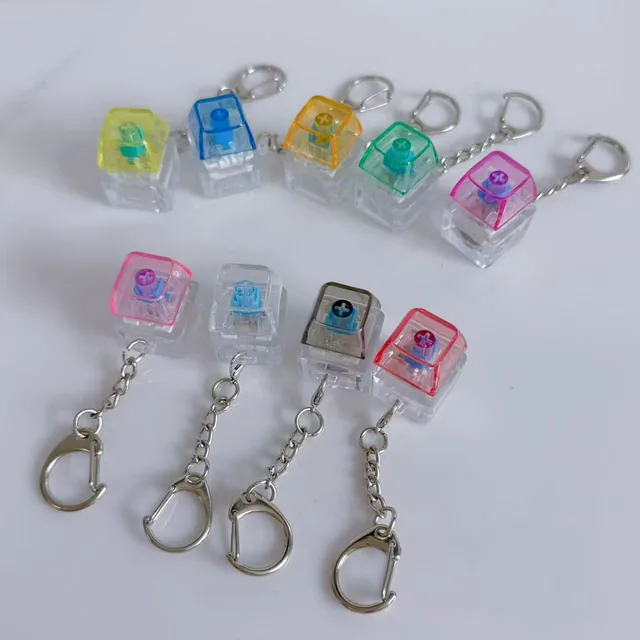
A keyboard fidget is bought for repeated pressing, a switch tester for comparing identified switches, and a working mini keyboard for sending input to a device. Their small size and similar keycaps can make the product photos look interchangeable. The useful distinction is what the selected item actually does.
On this page
A person looking for a satisfying bag accessory needs a different answer from someone choosing switches for a keyboard build. A buyer searching for a shortcut keypad needs confirmed device input. Put that purpose in the first line of the listing before describing colors or the number of keys.
| Product category | Main buying question | Evidence to request |
|---|---|---|
| Keyboard fidget | Do I like pressing and carrying it? | Exact version, normal pressing demonstration and supplied attachment |
| Switch tester | Which identified switch do I prefer? | Switch model at each position and the contents of the tester |
| Working mini keyboard or macropad | Will it send the inputs I need? | Documented connection, device support and configuration method |
What makes a switch tester useful?
A comparison tester needs an identifiable arrangement. Four unnamed buttons may provide four enjoyable presses, but they do not tell a keyboard builder which switch to buy. Ask for the model at each position and whether the board contains different switches or repeated examples of one model.
Linear, tactile and clicky describe aspects of switch action; they are not interchangeable product names. Housing, keycaps and the surface supporting the tester also affect what a listener hears. Use the tester to compare the supplied arrangement, rather than treating a short recording as the sound of a future complete keyboard.
Some testers also work as fidgets. That overlap does not establish computer input, removable parts or compatibility with a particular replacement switch. The keycap compatibility guide covers those separate construction questions.
Use a real SKU to explain the difference
Ruiwo’s transparent one-key series lists LC-07 as non-light and LC-08 as light-up, both with a catalog size of 2 × 2 × 2.7 cm. Those records identify a tactile product and its lighting version. They do not identify a named enthusiast switch or establish typing functionality.
A clear body makes more of the interior visible, but it does not prove the switch brand or a hot-swap connection. Likewise, an illuminated key is evidence of a light effect when demonstrated on the exact sample; it is not evidence of Bluetooth, charging or a USB data connection.
Write a listing that answers the customer's question
For a tactile item, lead with “one-key keyboard-style fidget keychain” and the exact version. Describe the ordinary press and the included attachment. Use “switch tester” as the main promise only when the switch identities and comparison function are documented. Reserve “programmable keypad” for an item with verified input and configuration features.
This also improves wholesale conversations. Send the supplier the intended use, exact SKU and the question the customer needs answered. A request for LC-08 with a real light demonstration is clearer than asking for a “mini RGB keyboard” when computer functions are not part of the requirement.
Common questions before ordering
Can a switch tester type on a computer?
A passive switch holder does not send keystrokes. A product with an input controller may do so, but its connection and supported functions need their own documentation.
Does a keyboard fidget need different switches under every key?
No. Repeated tactile action can be the whole purpose. Different identified switches matter when the buyer wants to compare switch types.
Browse the fidget keyboard catalog for tactile products. Send your shortlist through the wholesale inquiry with the intended use so the quotation describes the product your customers expect.